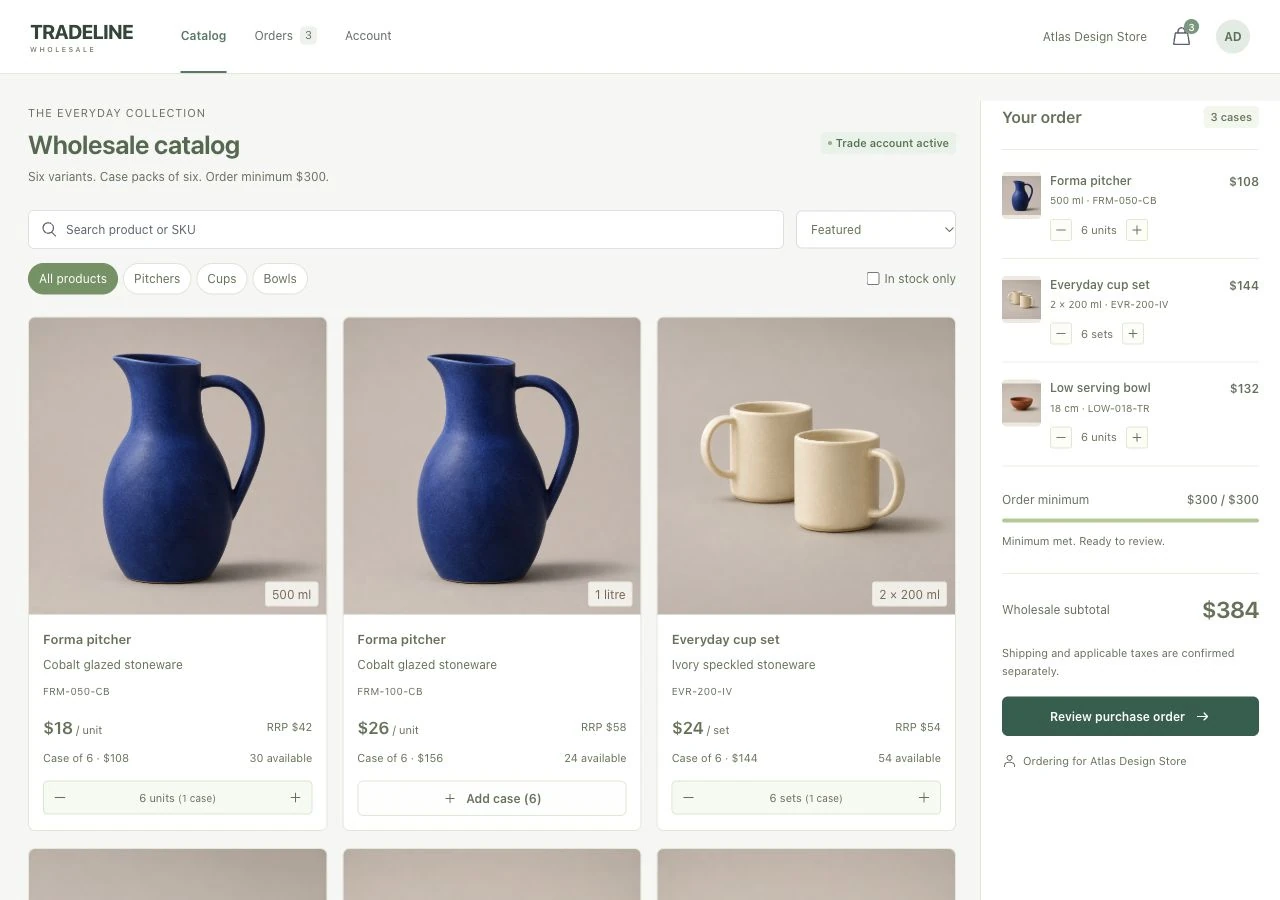
Keep buyer and warehouse records aligned when orders have minimums, case sizes and multiple dispatches.
Retail buyers order in packs, not arbitrary quantities. Stock, minimums and partially shipped lines need to stay consistent from catalog to warehouse.
The product decision
Validate the whole order before reserving inventory. Track fulfillment per line so a partial shipment preserves the remaining work.
A useful fit for Wholesale brands, trade suppliers, distributor portals and businesses managing structured B2B orders.
Implemented scope
The work it brings together.
A valid wholesale purchase order reserves inventory and retains ordered, dispatched and outstanding quantities for the buyer and warehouse.
01Variant and SKU catalog
02Case-pack cart and order minimum
03Stock-aware purchase-order validation
04Inventory reservation on submission
05Line-level partial fulfillment and activity
Select product variants
Build a case-pack order
Submit the purchase order
Track partial dispatches
The phone experience
A clear decision. At each step.
Validate the order before reservation and track dispatched quantities per line rather than relying on a single shipped flag.
Build in cases
A phone-friendly order panel preserves case quantities and a clear subtotal.
Review the purchase order
The buyer checks line items, account details and an internal reference before reserving stock.
Follow fulfillment
Dispatched and outstanding quantities remain visible on the purchase order.
Try the workflow
Explore Tradeline.
Enable JavaScript to try the browser walkthrough. The screens, scope and product decisions are available above.
Interactive walkthrough · changes stay on this device. Use sample details. “Reset walkthrough” clears this example’s progress.
The structure behind the interface
Connected by design.
Trade quantities come in packs. Stock, minimum order value and partially dispatched lines need more structure than a simple retail cart and one shipped flag.
01
Buyer workspace
Catalog variants, SKUs, case quantities, minimum progress and purchase-order review.
02
Order validation
Pack increments, available inventory and minimum value are checked before submission.
03
Warehouse record
Submission reserves stock and clears the cart; case dispatch updates quantities and order activity.
Observed acceptance checks
Request more than available stock
✓ The order quantity is rejected.
Submit a valid purchase order
✓ Inventory is reserved and the draft cart is cleared.
Dispatch one case of a larger order
✓ The remaining line quantities stay attached to the order.
Product decisions & tools +
Wholesale details in the buying flow
SKUs, unit or set pricing, case sizes, availability and minimum progress stay visible while the buyer builds the order.
One order across two workspaces
Buyer and warehouse views use the same purchase order, quantities and status. Fulfillment follows the submitted order rather than a separate summary.
Track each partial shipment
Dispatched and outstanding quantities are tracked per line, preserving an accurate record when an order leaves in more than one shipment.
Implementation
React · TypeScript · Inventory state model · Server validation · PostgreSQL
A product built around your business
Let’s shape your first release.
Tell us the users, the key tasks, the existing tools and what a useful first version needs to do. We’ll clarify the scope, data, review points and delivery requirements.
May we use Google Analytics to understand page visits, clicks toward inquiry forms or WhatsApp, and successful form inquiries? It uses analytics cookies. We use fixed public service and package labels, and exclude contact details, free-form answers and URL query strings from our events.
Your browser’s Global Privacy Control signal keeps optional analytics off.